Short description
We enhaced the UI for picking selectors aross all filters for Locations where Selectors can be set. The enhancement makes it easier to select groups or individual selectors making the filtering for Selectors more user friendly.
Why does it matter?
Filterering for Selectors in the locations filter could be a tedious process when many groups and individual selectors where present at a location. Also, it was not easy to understand and see what groups and selectors where set for the filter.
What’s new?
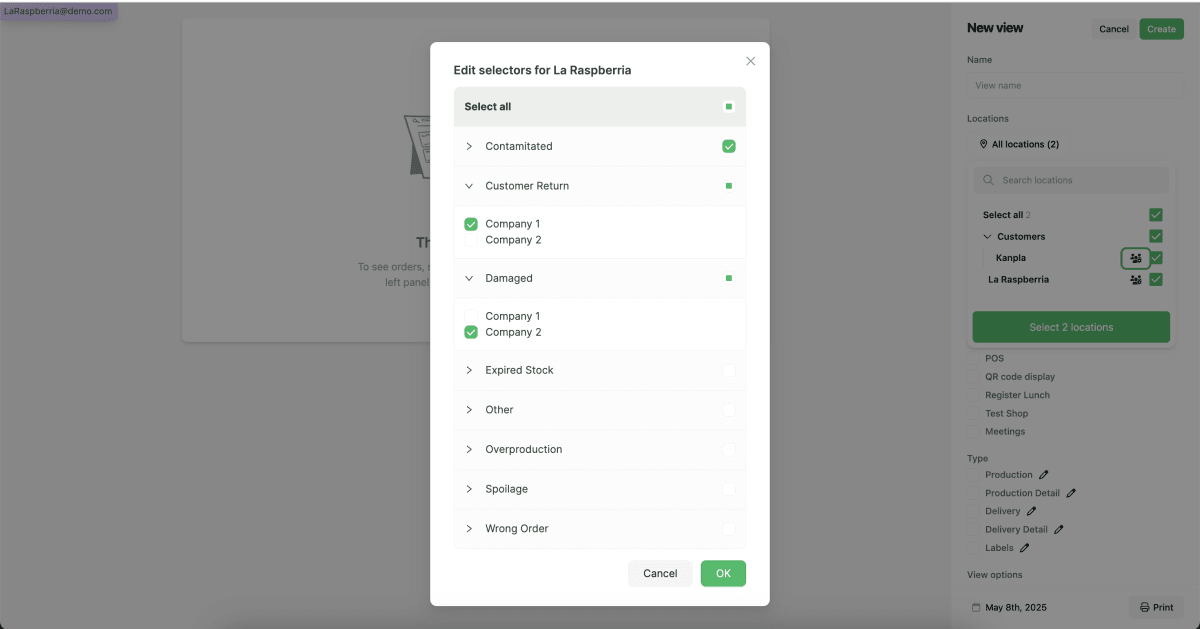
Admin users now experience an improved UI when setting Selectors in the location filter.
See an example of the new UI below.
How to use it?
Navigate to any Location filter. If selectors are setup on a location/salesplace, admin users are able to open up the modal in the screenshot above by clicking on the people-icon next to the location name.
On the pop-up modal, admin users can now select either a whole selector group and/or individual selectors.
When done, do not forget to confirm by clicking “OK” and save the locations.