Short description
Admin users can now link their QCal locations to Kanpla location/salesplaces in order to manage what resources and rooms the end-users of the App get access to.
Why does it matter?
For Room Booking, we have integrated with Nordic Screen's QCal. This integration requires our customers and the admin users to manage their locations and rooms/resources in QCal.
In order for users of the App to only get access to the resources and rooms that are relevant for them, admin users need to have the option to link locations in QCal to locations/salesplaces in Kanpla.
Definitions
QCal Location: A location in QCal represents a collection of resources and rooms. That means it refers to for example a building or a site where resources and meeting rooms are located.
Kanpla Location/Salesplace: A location in Kanpla represents a site, where our customers provide their services. For example an office building a school etc..
What’s new?
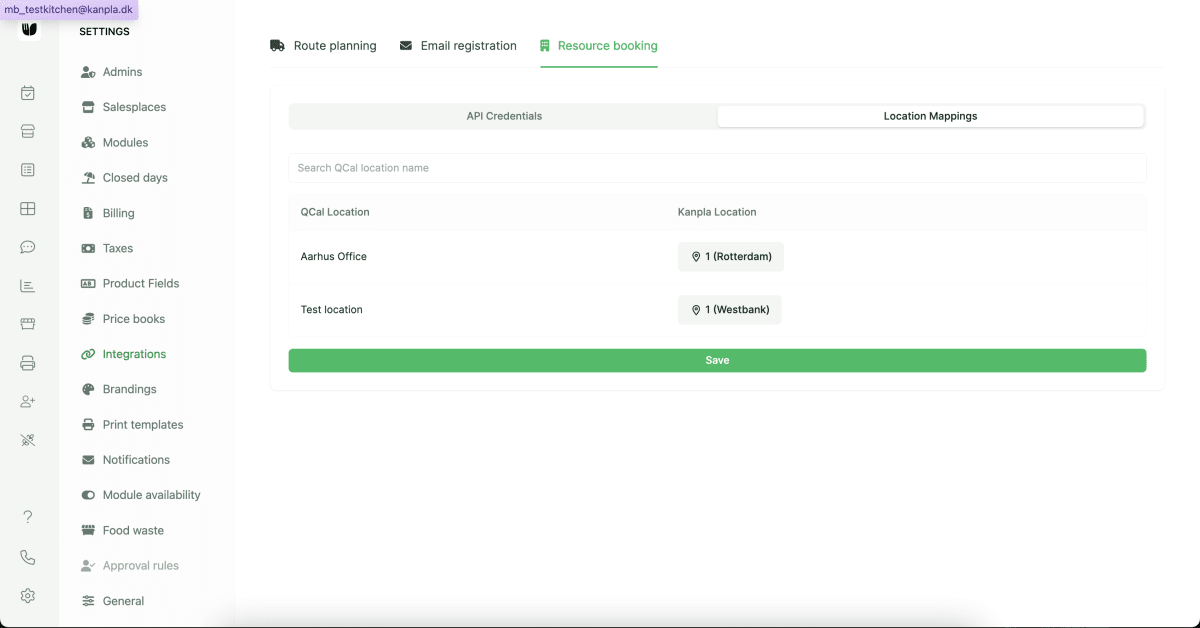
Admin users can now link locations available in QCal to locations and selectors in Kanpla.
How to use it?
Availability
Resource Booking is available as a pro plugin and must be enabled for customers in Kanpla Superadmin.
How does it work?
Navigate to Integrations in Settings. Before you can create a Location Mapping it is necessary that you setup the integration by adding the API credentials for the partner. See here for more info.
Once the API connection is in place, admin users can
Go to
Location MappingsView an overview of all
QCal Locationson the left sideAdd mapping of
Kanpla Locationsand/orSelectorson the rightMake sure to save any changes
Noteworthy comments
Important: If no location mapping is setup, the end-user will not be able to get any resources in the frontend app.