Short description
Data Key is now a required field in Text Inputs preparing for better UX in Data Export and other places.
Why it matters?
In order to lay the foundation for more scalable analytics and reporting and to leverage data keys in Text Inputs for Data Export all text inputs require a data key.
What’s new?
When creating a new Text Input for any module, users must now select a data key.
How to use it?
Go to Settings > Module > Plugin, then navigate to the plugin Text Input.
When creating a new Text Input or editing an existing one, users must now set a data key.
Noteworthy comments
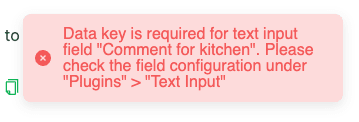
If a Text Input without a data key exists on a module, users will not be able to edit a module and save until they have also updated the data key for all Text Inputs missing a data key.
Users will be informed about this with an pop up message at the bottom of the screen like this: